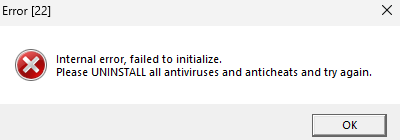
Windows 11 23h2,
On machine where cheat is tried to run, there is no any antivirus or anticheat.
I checked some threads about Windows patches which needs to be uninstalled - I did this but still is the same problem…
Big Thanks for reply! But the whole policy for malware scanning was also disabled on my pc.
I had a problem where I some day installed malware AV (Malwarebytes) and probably was not uninstalled properly (I saw some files in %appdata% and programdata). I had to wipe whole machine on Windows 10 and requested a HWID reset.
This solved my problem.
I will check your solution when I will go back on Win11
Do this thing which @tangguhstrl mentioned.
In my case I tried things like:
remove entire Windows Defender,
disable whole policy resposnbile for protection,
trying bunch of parameters for cs2,
reinstall c++ and .net Framework,
reinstall steam,
reinstall game,
Finally I reinstalled OS and that helps. I had issue where one antimalware service was still runing in background (mbam service…). I belive that NL will work on both of Windows Editions (11 23h2 and 10 22h2).
If you have any AV installed, start from disabling the Antivirus engine and disable firewall just to check if it helps.
If u will get in future this error check your GPU drivers…
Windows Update just installed older drivers than was available on web.
Cheat after update normally works.
Windows update mess with me for whole day… I saw that installed the latest version and when i checked in devmgmt.msc the integrated one was in 2020 update… Also when u install the GPU driver CHECK if the correct driver is installed.
I updated dedicated and integrated GPU drivers.
uninstall DragonCentre and MSISDK. Disable Nvidia Gforce overlay. Disable Overworlf. Uninstall Faceit anticheat. this should fix the issue please lmk if it didn’t fix
Hi, thanks for info, but just like i wrote in the last thread update, the GPU drivers was just not updated. Windows Update messed up everything… now everything is ok.